Steps
- From the process map, click the Bank Statements tile.
- In the Statements window, click the Statements icon in the upper left-hand corner. Review the Chevrons to see the total number of statements, how many are unassigned, how many are marked to be reconciled, and how many have been reconciled.
- Identify statements flagged in yellow — these indicate a reconciliation issue.
- To review the source data, click the icon in the File column for the statement. This opens a PDF copy of the original statement so you can inspect the data for inaccuracies or redacted information.
- Return to the Statements window and open the Reconcile view for the flagged statement. Read the error message to identify the specific reconciliation issue.
- Common reconciliation errors include:
• Transactions outside the statement's start and end date range
• Account balance variance is not equal to zero
• Date overlap between two statements - Correct the data per the error message. Once the discrepancy is fixed, click the Save icon, then click Reconcile.
- Once reconciled, the statement is locked — transactions can no longer be edited. If further changes are needed, click Unreconcile to reopen the statement, make corrections, then reconcile again.
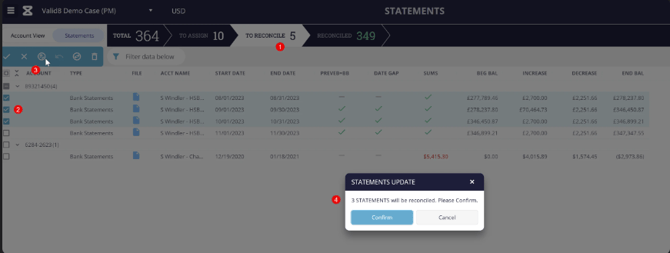
Bulk reconciliation
- On the Statements view, click the To Reconcile chevron.
- Select the statement lines you want to reconcile.
- Click the Reconcile button.
- The user will be updated with how many statements will be reconciled.