
Rather than uploading Cash Journal reports directly extracted from ERP Systems (like a QuickBooks General Ledger List) you can upload a list of cash transactions via our Valid8 excel template (CSV format).
This process follows three steps:
- Download the Cash Journal extract template
- Update the template with your transactions
- Upload the Cash Journal
Download the Cash Journal Extract Template
Download this CSV file - Valid8 Cash Report Template. This is an excel (CSV) template with the required columns for uploading Cash Journals.
Update the Template with your Transactions
Prepare your data for loading in the template file using the 8 columns provided.

- Copy (or type) your data into the columns.
- Bank account - required. Name of the GL Cash Account. This will be the name used when we automatically create the account that these transactions belong to.
- Transaction date - required. Date that the cash transaction was reflected in the accounting system. Mapped to ERP Date.
- Transaction type. Detailing the specific nature of the cash movement, such as deposits, payments or expenses. Mapped to Transaction Type
- Num
- Name. Description of the transaction.
- Description
- Amount - required. Amount of the cash transaction reflected in the accounting system. Debit amounts as positive amounts and credit amounts as negative amounts.
- Balance. Most Cash Journal reports have a running balance of the account. Valid8 does not use this field within it's matching process.
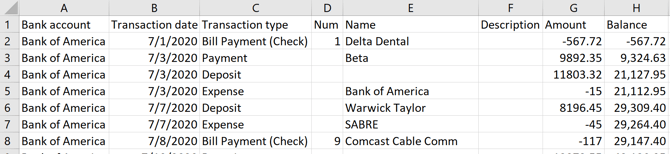
- Save the output as CSV (UTF)
Upload the Cash Journal
-
On the process map, click the Load Evidence Tile and select the Cash Journal Extract option (under the Accounting Data Import group).
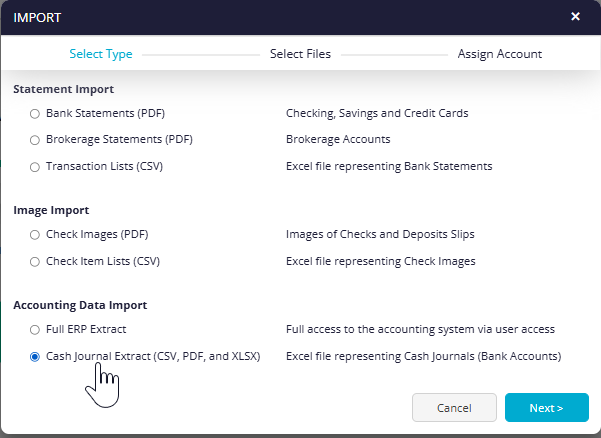
- Click the Next button.
- Select the template file you created and once that's preloaded click the Next button.
- Lastly click the Start Extraction button.