
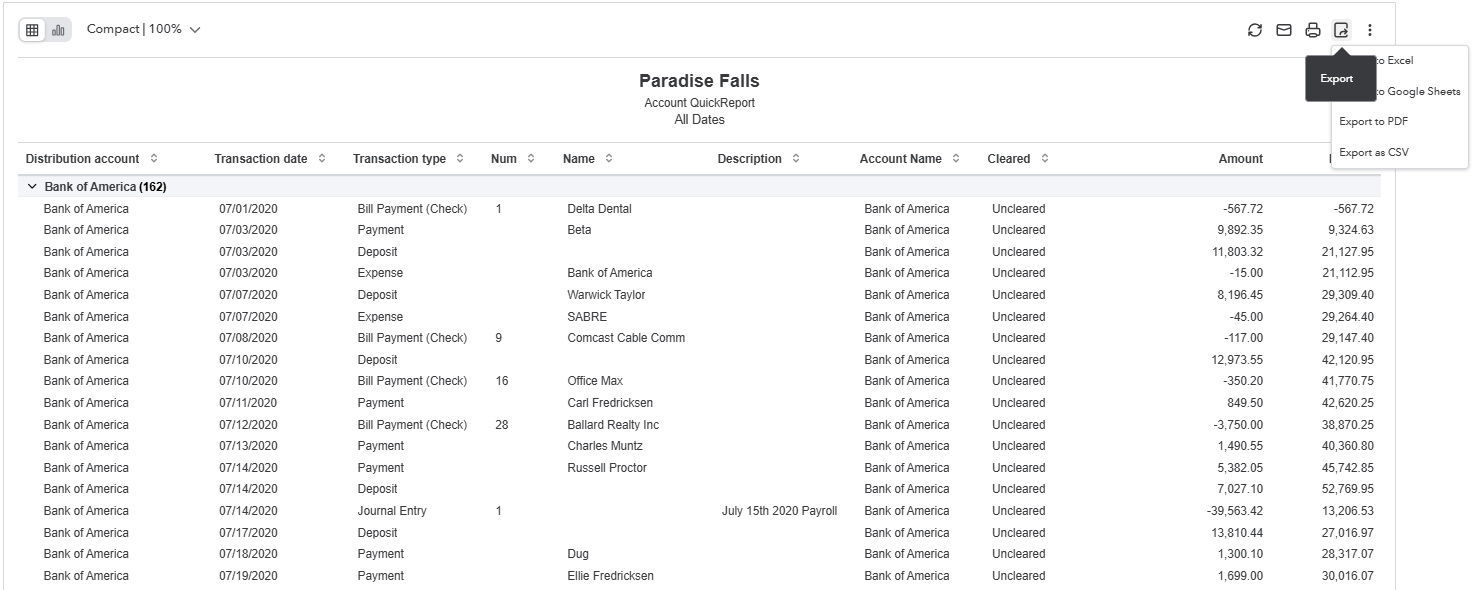
Here is an example of a QuickBooks Online Account QuickReport. This shows a bank Account named Bank of America (shown in the first column) with 162 transactions.
The columns that get imported into Valid8 (and shown on the Cash Match verification screen) are:
- The Distribution Account is the name of the account, and it is this name that is used to automatically create the Account and is shown as the ERP GL ACCOUNT
- Transaction Data is shown as ERP Date
- Name is shown as DESCRIPTION
- Amount is shown in Valid8 as DEBITS and CREDITS.
Users of QuickBooks can click the Export (show on the top right) to export this report, ready to be loaded as evidence into Valid8.
If the additional support columns are added, these will show to the far right of the data above:
- Account Type - used as the ACCT TYPE when setting up the account. Either Checking or Credit Card.
- Payment Method (will be appended to the Name field to form part of a longer description - "Name (Payment Method)"
- Transaction ID - Shown in the GL TRX ID field.